Why is there a delay before my time entries appear in Billables AI?
Last updated: September 24, 2026
After completing a task, you may notice that the corresponding time entry does not appear in your Billables AI dashboard immediately. This is expected behavior. Here's what to know about timing and how to speed things up.
How long does it take for entries to appear?
Billables AI typically generates time entries within approximately 5 minutes of the activity occurring. However, the system waits up to 15 minutes before posting entries to your time dashboard. This means there can be a delay of up to ~15 minutes between completing a task and seeing the resulting entry in your dashboard.
How to fetch entries sooner
Instead of refreshing your browser tab, use the Sync Entries button in the dashboard.
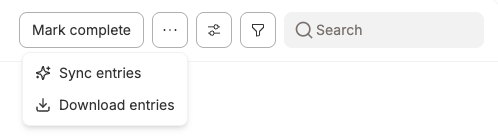
Sync entries triggers a new generate immediately but you'll need to then refresh the browser to pull them in. Refreshing the browser alone doesn't trigger any new generation.
The Sync entries button will be greyed out unless you are viewing only today's time entries.
Tips for reviewing entries accurately
To see the most granular time entries as you work, make sure your grouping setting is set to No Grouping. You can find this under Settings > Billing Settings > No Grouping.
What if entries are significantly delayed?
In some cases, entries may take longer than 15 minutes to appear — Teams calls, for instance, often take longer than email.
If you notice entries consistently appearing hours later, try using the Sync Entries button rather than a standard browser refresh, as the sync button specifically fetches unprocessed entries. If the problem persists, contact support@billables.ai for assistance.
What if I want faster, near instant time entry generation?
There is a premium feature where entries can be generated in less than a minute. This comes with our premium package (https://billables.ai/pricing). Reach out to your account manager or support@billables.ai to upgrade for this feature.