Retroactive Time Capture
Last updated: August 5, 2026
New to Billables AI or missed connecting your email and calendar? No worries — you can add them anytime.
How Billables AI Captures Your Time
Billables AI tracks time differently than most tools. Rather than inferring duration from timestamps, it captures actual time spent working — measuring how long you draft an email, edit a document, or stay active across your connected tools. This requires a live connection to your machine as work happens.
For activities that occurred before your integrations were set up, we can still retroactively log entries for emails, calls, calendar events, and meetings — so nothing falls through the cracks. Since Billables AI wasn't connected at the time, these entries will reflect a 0.1-hour duration as a placeholder. From there, you can review and adjust each entry to match the time you actually spent.
Follow these steps to upload retroactive activity:
1) From your Billables AI account, navigate to the settings page.
2) From the settings page, select the Retro Capture tab.
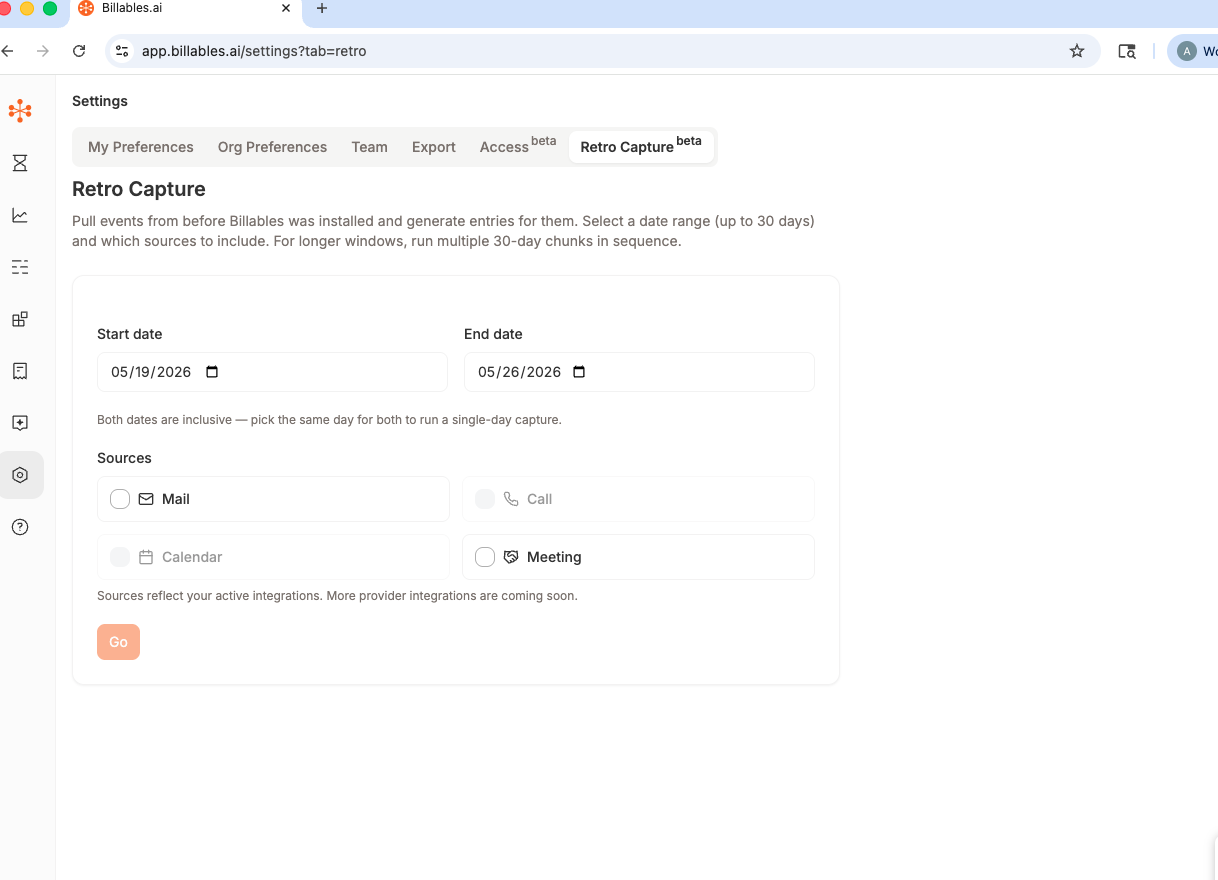
3) Select the date range you'd like to retrieve activity from and select the sources.
Note: You must have active integrations for the sources you'd like to pull activity from.
4) Click "Go." Expect time entries to generate in 15-20 minutes. This is because Billables AI is accessing historic activity from Microsoft and Zoom.
Note: Retroactive time capture currently only supports Microsoft mail/calendar and Zoom activity.