
This feature is available for Clio, MyCase and LeanLaw users and is best suited for those who are not already reviewing their time in Billables AI regularly.
How it Works
Time Finder automatically compares your Billables AI–captured activity to your manually entered activity in Clio, MyCase or LeanLaw, helping you uncover work that you may have missed. Time Finder works best for those who are still manually entering their time directly in Clio, MyCase or LeanLaw.
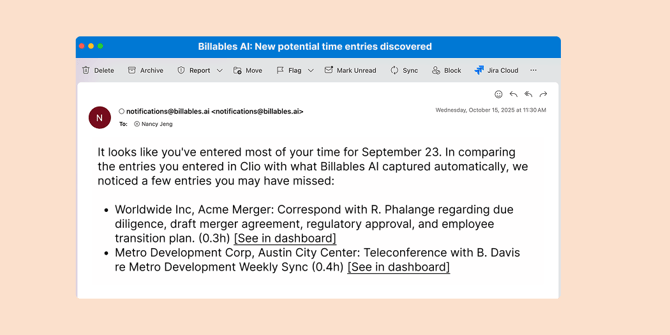
When you sign up for Time Finder, you'll get an email report that shows you any additionally unbilled time compared to time you've already entered into your practice management system.
Requirements
- Must be a Clio, MyCase or LeanLaw user with an integrated account
- Must have multiple integrations enabled (email, calendar, browser, meetings, etc.)
Implementation
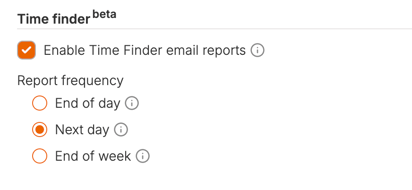
- Go to the Billables AI Settings page and find the section "Time Finder" section.
- Click the box to enable Time Finder reports
- Select your desired frequency of reports.
- Click Save to apply the settings
FAQs
Where can I find my missing time entry in my dashboard?
Click on the link in your Time Finder email report which takes you to your dashboard on the date of the missing activity. Use the search bar and enter keywords to find the missing activity within your dashboard. You can also use filters to further find activity by client, matter or source.
I didn't get an email today, is TimeFinder down?
Billables AI will not generate an email if your manual activity did not leave a gap detectable by our AI.
Why is there time captured in Billables AI that doesn’t appear in the Time Finder report?
Time Finder only includes activities where Billables AI has high confidence that work was captured but not billed. Some unbilled activities may not meet that confidence threshold, but you can always review all captured time directly in your dashboard.
Why is it best for people who manually enter time into Clio, MyCase, LeanLaw?
If you already review and bill your time directly within Billables AI, you’re already seeing all your captured activity in your dashboard. This feature is designed for users who manually enter time in their practice management system but want a safety net—an easy report that notifies them to check if Billables AI has captured any additional work they may have missed.