CosmoLex Billing Code Import
Last updated: June 2, 2026
This article explains how to export your clients and matters from CosmoLex and import them into Billables AI.
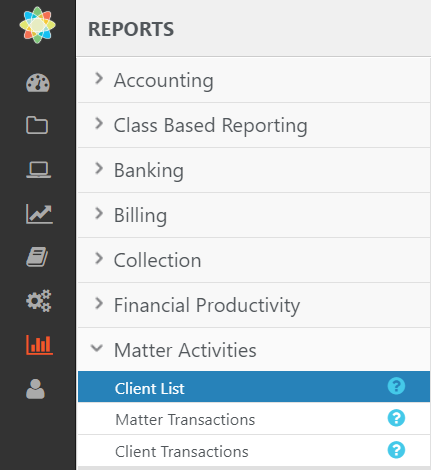
In your CosmoLex account, go to Reports > Matter Activities > Client List
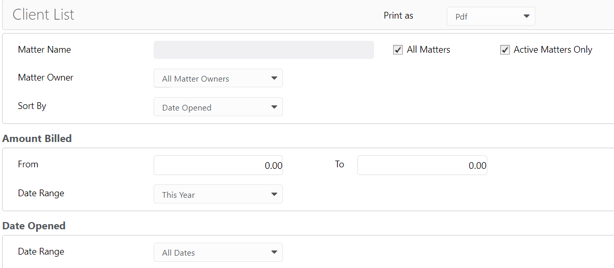
Choose which matters you want to export. We recommend exporting active matters only.
If there are limited users within your firm, we recommend exporting matters related to those users
If all members of a firm will be using Billables, we recommend exporting All Matters.
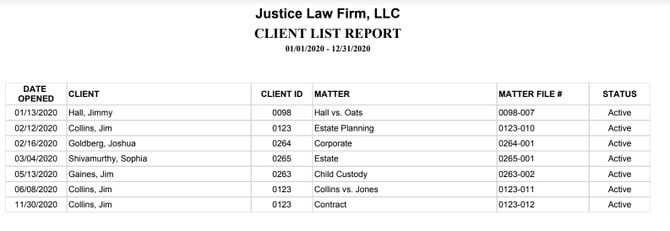
Your sample download should look like this:
Download the Bulk Upload CSV Template from Billables and populate with the data from CosmoLex.
Make sure the fields from CosmoLex match to the corresponding field in Billables:
Client (Billables): Client (CosmoLex)
Client_Code (Billables): Client ID (CosmoLex)
Matter (Billables): Matter (CosmoLex)
Matter_Code (Billables): Matter File # (CosmoLex)
Note:
Client is a required field
Make sure not to change the column headers when updating the spreadsheet
4. Bulk upload your Billing Codes to Billables. You should see your matters populate on the Billing Codes page shortly.